The right settings depend far more on the model than on any general rule. This guide explains how to choose them, starting from the model’s own recommendations. For where each setting lives in the Generate panel, see Render settings.
Each model has recommended settings, which are shown as marks on the sliders and which you can edit in the Model Manager. When you change models, InvokeAI keeps your current settings if they are compatible, so after switching models click Reset all to model defaults (the ↺ button in the Generate panel’s title bar) to start from the new model’s recommendations. Each model family’s page under Local Models lists its typical values.
More steps refine an image up to a point; beyond it, an image changes little and generation only takes longer.
Distilled models — Turbo, Lightning and Schnell variants, and models used with a Lightning or Turbo LoRA — are trained for a specific small number of steps, typically 4 to 10. Using many more does not help and can make results worse.
Standard models usually need 25 to 50 steps. SD 1.5 and SDXL work well at about 30.
To explore ideas quickly, generate a batch at fewer steps, then recall the seed of the image you like and generate it again at the full step count (see Seeds below).
The scheduler decides how much noise is removed at each step. Which ones are offered depends on the model:
SD 1.5, SD 2.x and SDXL offer the full list. DPM++ 2M Karras and Euler are good general-purpose choices; Euler Ancestral and the other Ancestral and SDE schedulers add variety and keep changing the image as steps increase; UniPC and DPM++ 3M reach good results in fewer steps. LCM and TCD are only for LCM- and TCD-distilled models.
Flow models, such as FLUX.1, FLUX.2, Z-Image and ERNIE-Image, offer Euler, Heun (2nd order), which is slower per step but can need fewer steps, and LCM for distilled models.
Anima has its own short list, starting with Euler.
Some families, including SD 3.5, Qwen Image, CogView4, Krea-2 and Ideogram 4, use a fixed schedule and do not show the field.
Use model default scheduler switches back to the model’s own choice.
The seed sets the starting noise, so the same model, prompt, seed and settings reproduce the same image.
While exploring, leave Seed mode on Random to get a different image every time.
To refine a result, set the seed to Fixed, for example by clicking the image’s thumbnail under Recent seeds, and then change one setting at a time so you can see exactly what it does.
To polish a promising draft, recall its seed with Use Seed from the image’s Recall Metadata menu and generate it again at more steps or a larger size.
Each model has an optimal image area, around one megapixel for most current models and less for SD 1.5. Results are best near that size; much larger images can repeat subjects or distort anatomy. Use Set optimal size in the Size section, and upscale afterwards for larger images.
For image-to-image, inpainting and outpainting on the Canvas, Denoising strength sets how much the existing image may change. Around 30% to 50% keeps the composition and colors while changing details; 70% and above (the default is 75%) reworks the image substantially, keeping only its broad layout.
Appendix: sampler convergence on SD 1.x (historical)
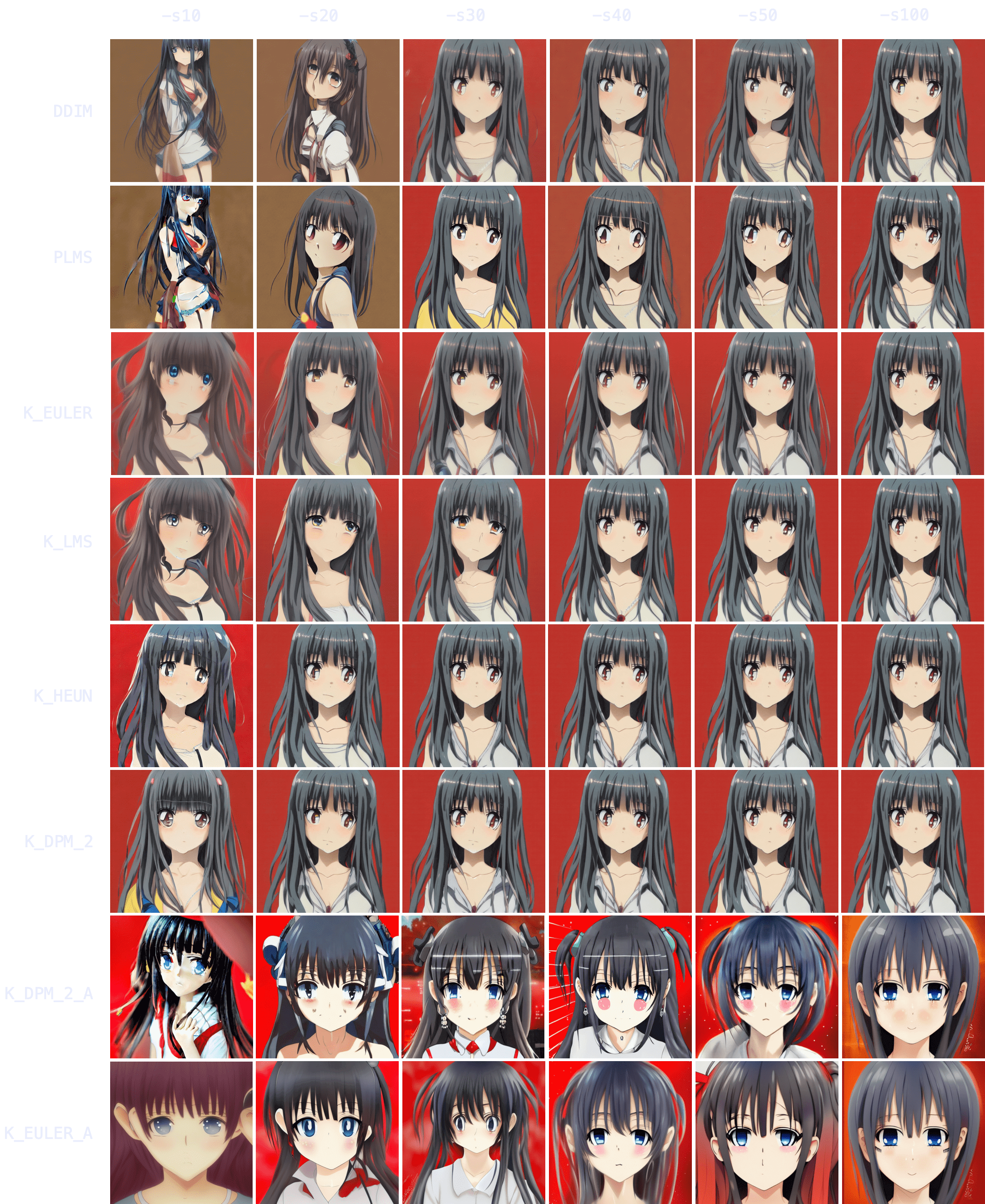
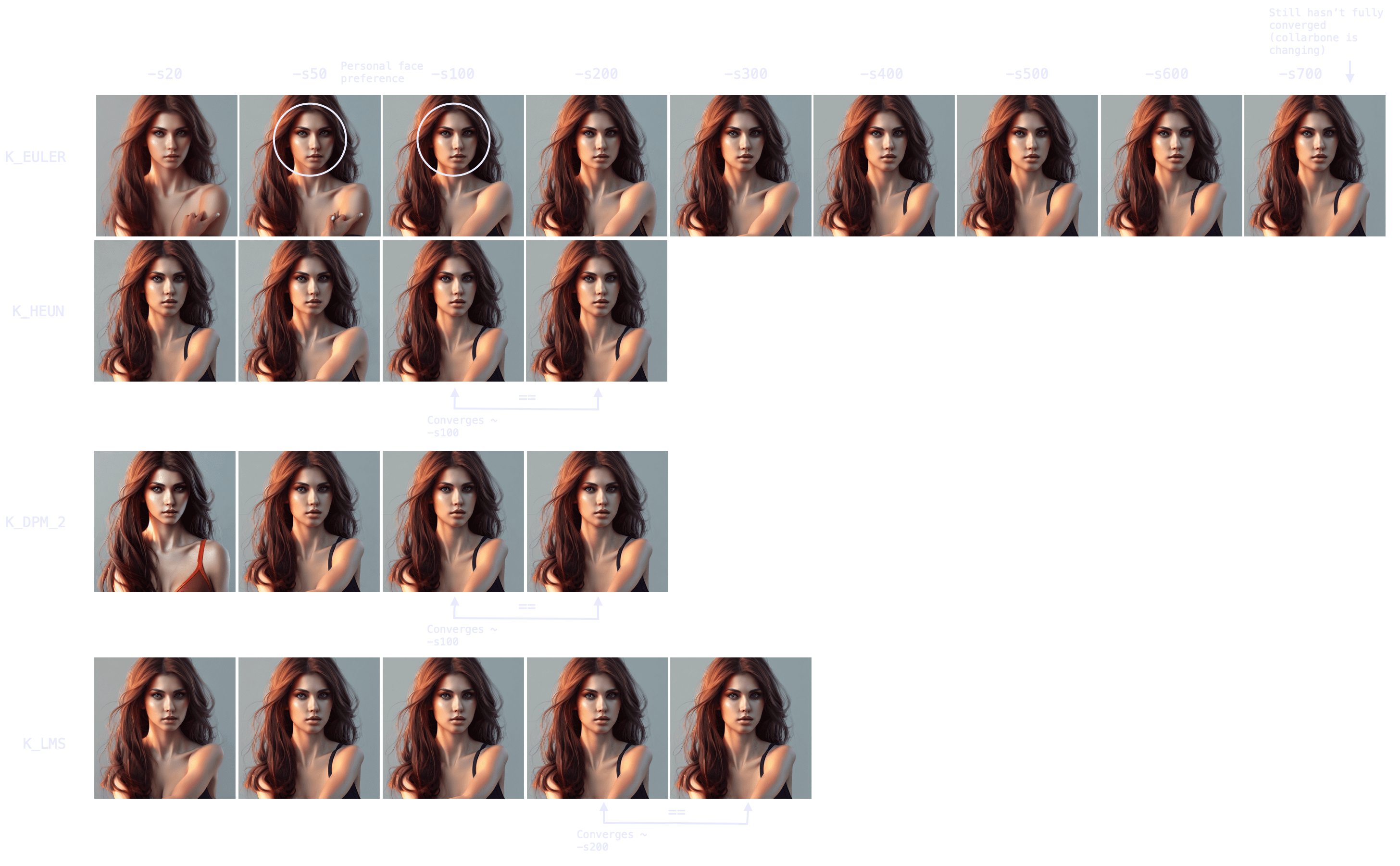
Results converge as steps are increased, except with the ancestral samplers (K_DPM_2_A and K_EULER_A). Often at 100 steps or more, but sometimes not until 700.
Producing a batch of candidate images at low step counts (8 to 30) can save hours of computation.
K_HEUN and K_DPM_2 converge in fewer steps, but are slower per step.
K_DPM_2_A and K_EULER_A incorporate a lot of creativity and variability.
Immediately, you can notice results tend to converge — that is, as -s (step) values increase, images look more and more similar until there comes a point where the image no longer changes.
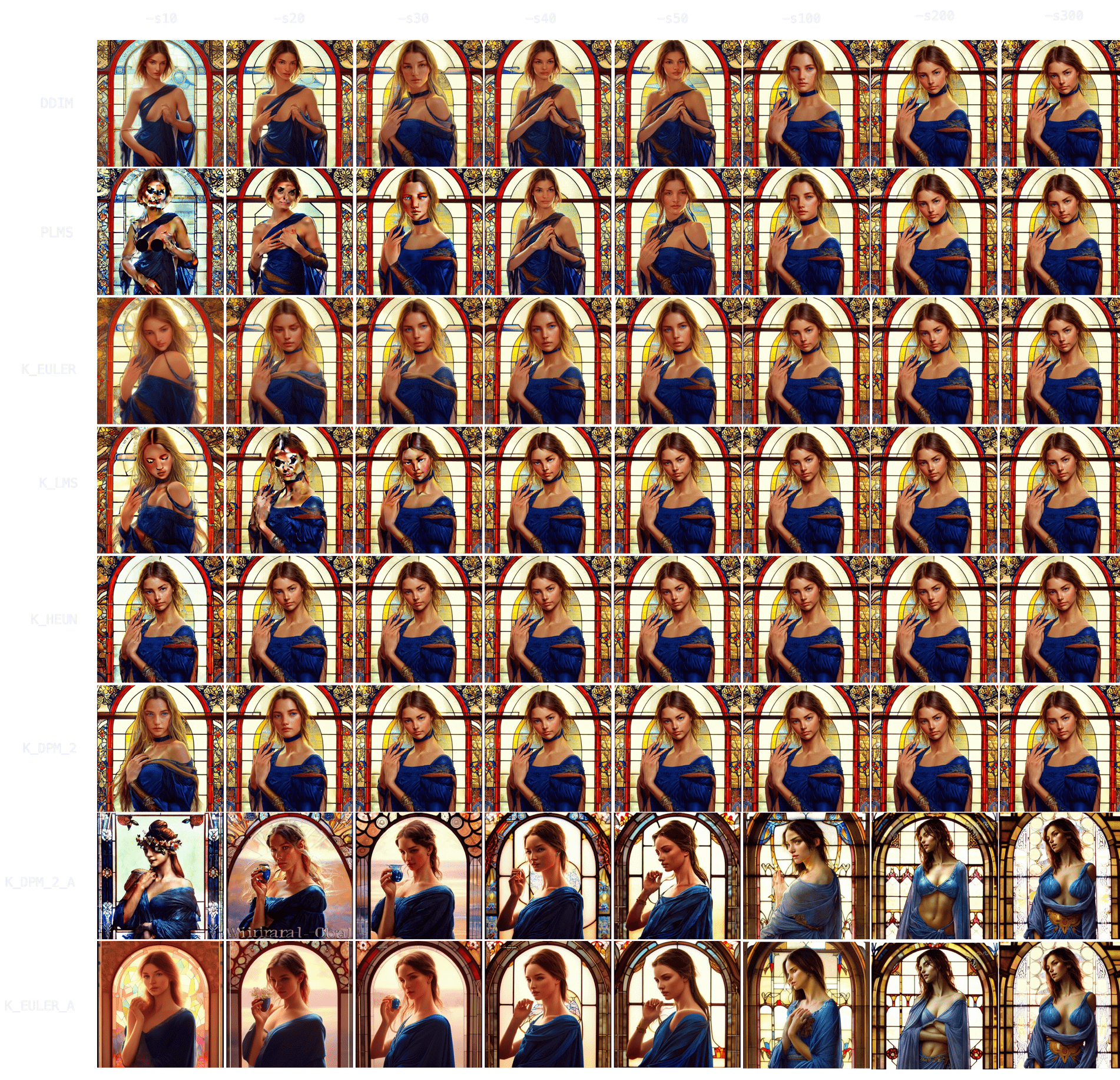
You can also notice how DDIM and PLMS eventually tend to converge to K-sampler results as steps are increased. Among K-samplers, K_HEUN and K_DPM_2 seem to require the fewest steps to converge, and even at low step counts they are good indicators of the final result. Finally, K_DPM_2_A and K_EULER_A seem to do a bit of their own thing and don’t keep much similarity with the rest of the samplers.
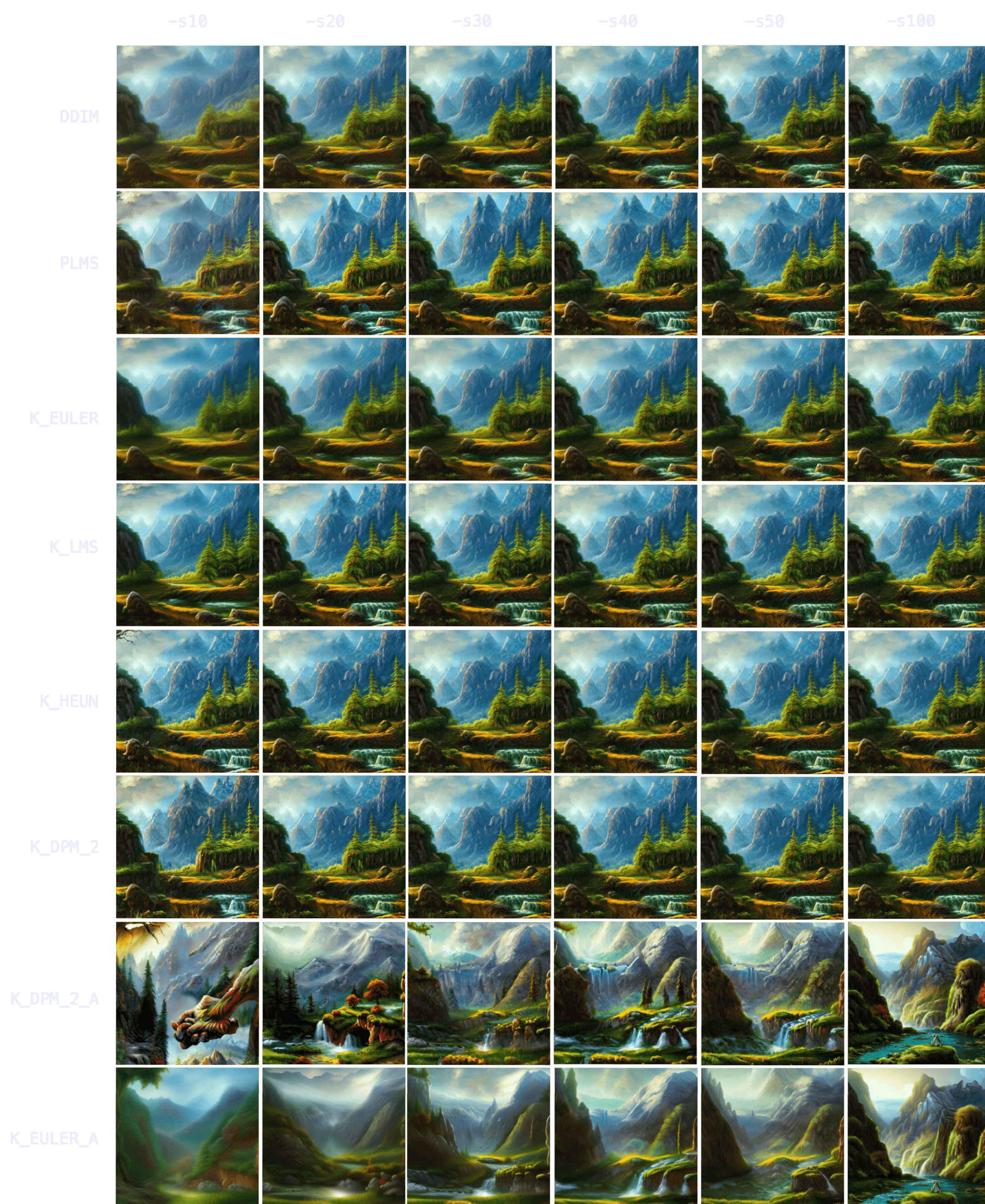
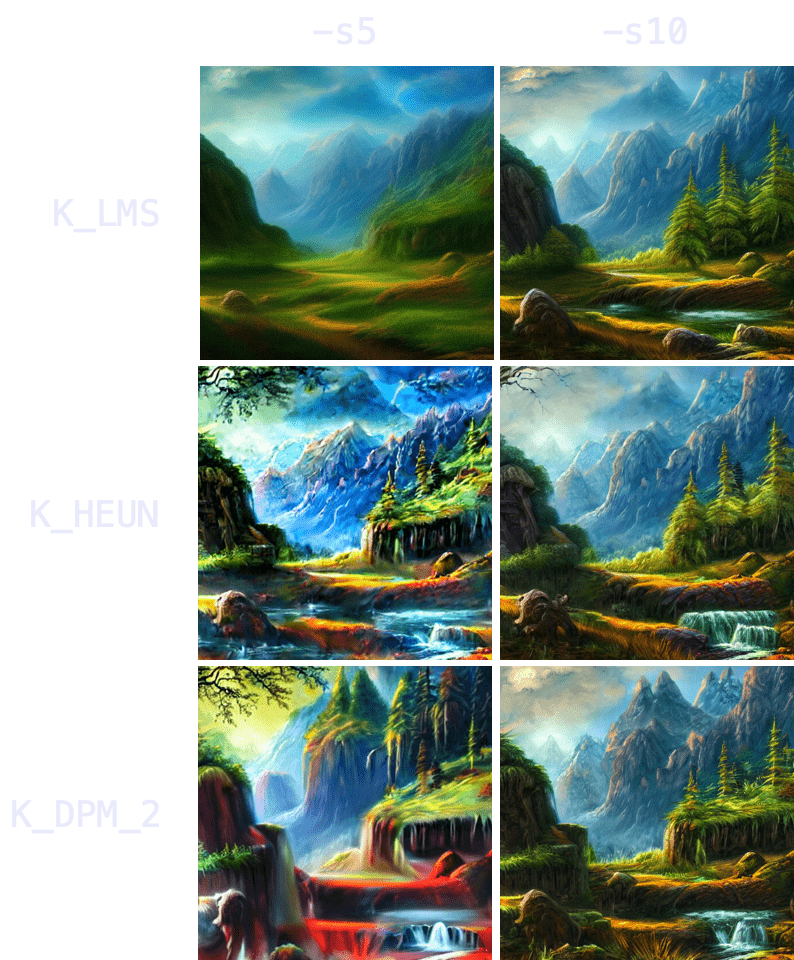
With nature, you can see how initial results are even more indicative of the final result — more so than with characters/people. K_HEUN and K_DPM_2 are again the quickest indicators, almost right from the start. Results also converge faster (e.g. K_HEUN converged at -s21).
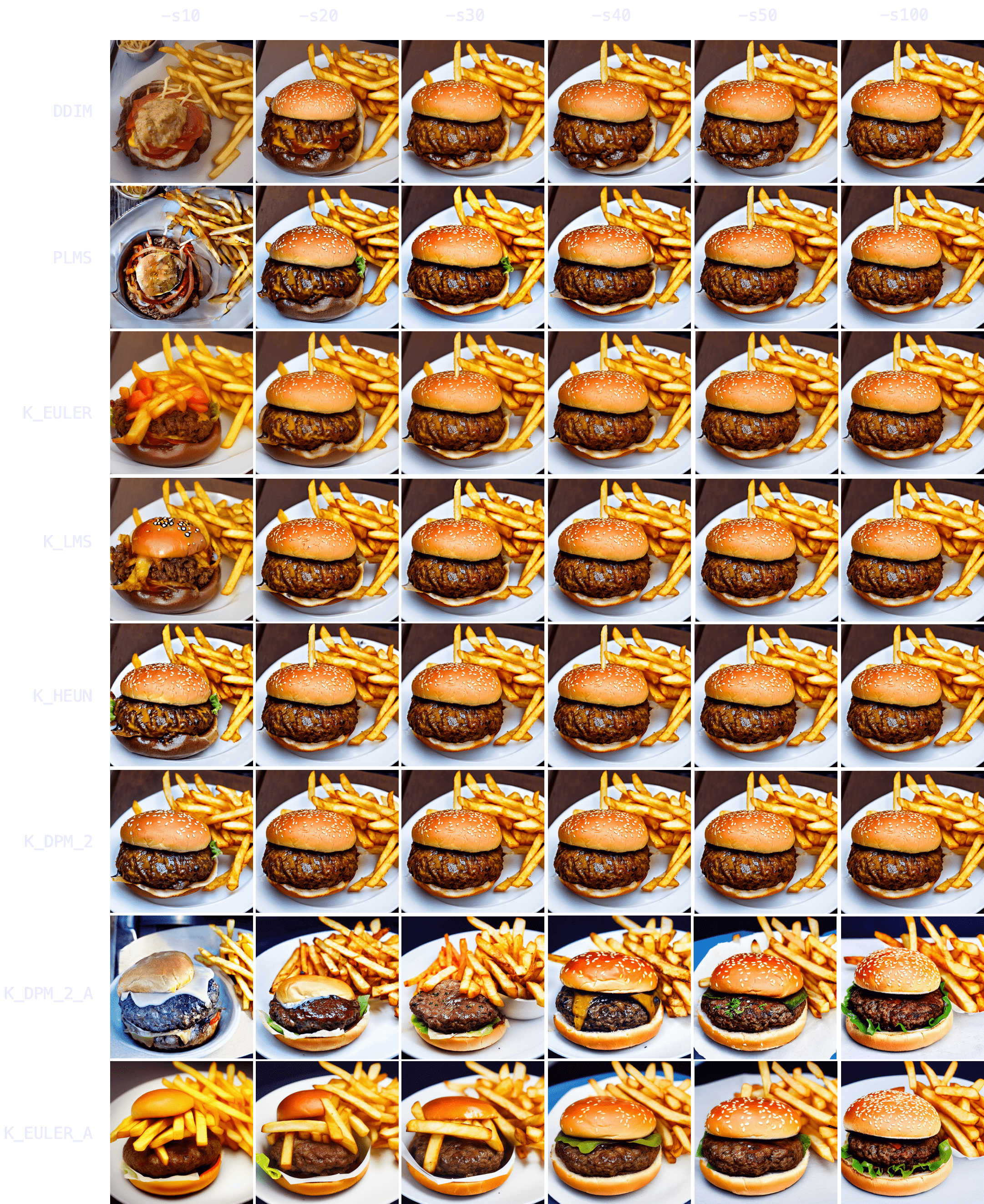
"a hamburger with a bowl of french fries" -W512 -H512 -C7.5 -S4053222918
Again, K_HEUN and K_DPM_2 take the fewest number of steps to be good indicators of the final result. K_DPM_2_A and K_EULER_A seem to incorporate a lot of creativity/variability, capable of producing rotten hamburgers, but also of adding lettuce to the mix. And they’re the only samplers that produced an actual ‘bowl of fries’!
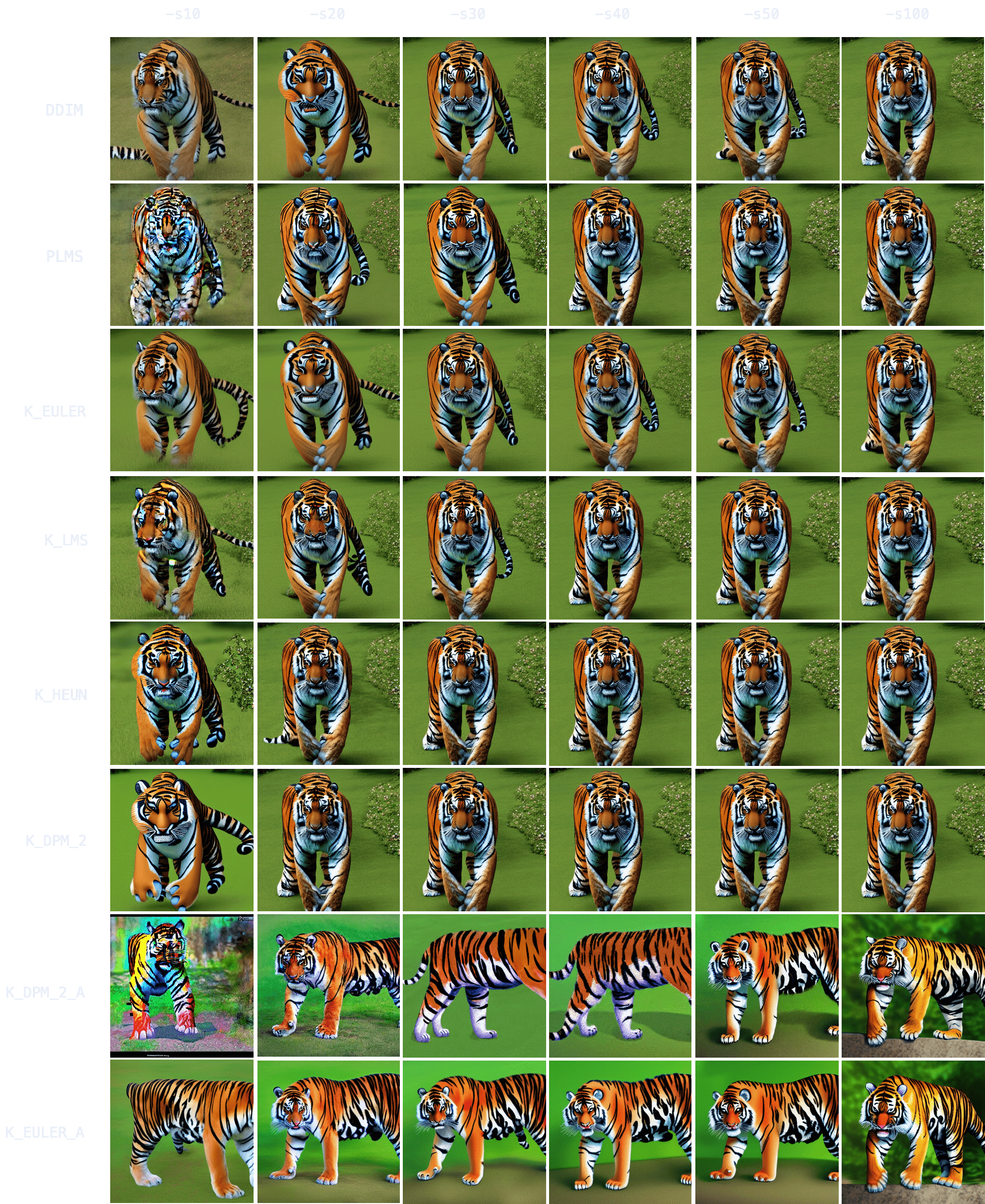
"grown tiger, full body" -W512 -H512 -C7.5 -S3721629802
K_HEUN and K_DPM_2 once again require the least number of steps to be indicative of the final result (around -s30), while other samplers are still struggling with several tails or malformed back legs.
It also takes longer to converge (for comparison, K_HEUN required around 150 steps to converge). This is normal, as producing human/animal faces/bodies is one of the things the model struggles the most with. For these topics, running for more steps will often increase coherence within the composition.
"Ultra realistic photo, (Miranda Bloom-Kerr), young, stunning model, blue eyes, blond hair, beautiful face, intricate, highly detailed, smooth, art by artgerm and greg rutkowski and alphonse mucha, stained glass" -W512 -H512 -C7.5 -S2131956332. (This time, we will go up to 300 steps).
Observing the results, it again takes longer for all samplers to converge (K_HEUN took around 150 steps), but we can observe good indicative results much earlier (see: K_HEUN). Conversely, DDIM and PLMS are still undergoing moderate changes (see: lace around her neck), even at -s300.
In fact, as we can see in this other experiment, some samplers can take 700+ steps to converge when generating people.
Note also the point of convergence may not be the most desirable state (e.g. you might prefer an earlier version of the face that is more rounded), but it will probably be the most coherent regarding arms/hands/face attributes. You can always merge different images with a photo editing tool and pass it through img2img to smoothen the composition.
This realization about convergence is very useful because it means you don’t need to create a batch of 100 images (-n100) at -s100 just to choose your favorite 2 or 3 images.
You can produce the same 100 images at -s10 to -s30 using a K-sampler (since they converge faster), get a rough idea of the final result, choose your 2 or 3 favorite ones, and then run -s100 on those specific images to polish details. This technique is 3-8x as quick.
Finally, it is relevant to mention that, in general, there are 3 important moments in the process of image formation as steps increase:
The Indicator Stage:
The earliest point at which an image becomes a good indicator of the final result. This is useful for batch generation at low step values to preview outputs before committing to higher steps.
The Coherence Stage:
The point at which an image becomes coherent, even if different from the final converged result. This is useful for low-step batch generation where quality is improved via other techniques (like inpainting) rather than raw step count.
The Convergence Stage:
The point at which an image fully converges and stops changing.